
 Sami Can Tandogdu
One point two billion. Weekly.
That is the audience OpenAI put in front of developers at DevDay 2026.
ChatGPT weekly active users
| Reported | Weekly users |
|---|---|
100M | |
200M | |
250M | |
300M | |
400M | |
800M | |
900M | |
1.2B |
Let’s accept it: ChatGPT is a distribution channel.
There are lots of reasons that businesses will want to be on ChatGPT – because people using ChatGPT are already in research-purchase-mode, trip-planning-mode, finances-understanding-mode, and so on.
For the first time ever at DevDay, OpenAI came on stage and laid out a very compelling case as to why they believe ChatGPT will become the first superapp in the West to achieve such massive mainstream adoption. How do MCP Apps and MCP Apps endpoints fit into this vision for superapps?
An app that contains other apps. It’s coming into view.
If you live in North America or Europe, you might be familiar with the term superapp, but chances are you don’t use one as your main gateway to everyday activities and services.
If you are more familiar with the experience of China’s Weixin (Mini Programs for shopping, food, travel, government services, etc.) or that of Southeast Asia’s Grab (for rides, deliveries, payments, etc.) then you can start thinking about superapps. Weixin’s and Grab’s apps already function as superapps for their respective user bases.
For a Western audience, it is hard to think of a distribution medium that is similar to what OpenAI is proposing for ChatGPT without mentioning the Apple App Store and Google Play Store, letting businesses build a software business and reach tens to hundreds of millions of customers. However, these are limited to mobile apps running on mobile and in some cases desktop operating systems.
But distribution to the Western-style software venture relies upon the App Store & Google Play distribution to mobile operating system / device ecosystems.
We believe ChatGPT’s biggest opportunity is as a hub that developers can build software for, as it will become the de facto entry point for users on many devices.
And the entry point is a conversation.
A problem is described and ChatGPT identifies the solution needed. The corresponding app opens up and the work can be continued there.
That is where MCP Apps matter.
MCP = Model Context Protocol. It’s a protocol that allows AI applications to interact with external tools and data. An application, such as a business, can expose functions via an MCP server. For example: search for products in the inventory, read a document, create a new task, update a record.
You can think of these “connectors” as a way to connect your tools and then have the assistant work with that information outside of the conversation.
This is great software, but there is so much more to developing software than retrieving information and describing to the user how to use that information.
For instance, planning a trip, comparing holiday options, looking at a map and then deciding to book a hotel near a conference.
MCP Apps are a way to add more interactivity to the typical retrieval of information and description of the action that follows.
A tool could produce information along with a reference to a UI to render. The host application would then render that UI in a sandboxed frame. The UI could then also communicate with the host and call other tools through it. This is all defined by the MCP Apps standard.
Think about planning a trip.
You ask for a hotel near a conference, within your budget, with somewhere nearby to run in the morning.
A travel application can show hotels near a conference location for certain dates within a budget. The returned interactive map lets you select two hotels, compare them, change the dates, etc. – and then you can ask ChatGPT whether the saving of the cheaper option is worth the longer commutes to and from it.
This conversation can help surface the various factors by which one might evaluate hotels and assist in ranking them. However, the ultimate selection and an inspection of chosen hotels on an interactive map would likely be far more practical than strictly typing out all of this in a text dialog.
Each part does something useful.
From a question to an app
- Describe the task“Find a hotel near my conference.”
- Discover an appChatGPT surfaces a relevant travel app.
- Use its interfaceCompare hotels, explore the map, adjust dates.
- Continue the conversationDiscuss the options and decide what works.
So, instead of having to type out all of your interactions with software in a text box, you can use conversation to access useful interfaces. A calendar is a better way to choose a date than to type out dates. A map is a better way to understand distance than to type out distances.
MCP Apps is an open extension to MCP, released in January 2026 as MCP-UI combined with OpenAI’s Apps SDK. This new entity is supported by all hosts that implement a compatible version of MCP. Importantly, MCP Apps is larger than OpenAI Apps.
What OpenAI announced at their DevDay on September 29 is plugin extensions for apps (so-called plugins) for their ChatGPT environment like sidebar plugins, chat-extensions, file-viewers and editors as well as input-forms of greater complexity.
Apps can have a more substantial home inside ChatGPT.
This is also where Recurse fits.
Yes, I do. We’ve been referring to the things that people build with Recurse as “agent apps,” but really we’re an MCP app company.
We help anyone to write and deploy so-called agent apps and then host these as MCP servers that can be connected to by ChatGPT and other applications running on MCP-enabled hosts.
This shifts the distribution of your solutions to the places where people already are asking for help, and we help you to deploy your solutions (what we call “agent apps”) to those places.
Again, the key difference between the OpenAI shared standard for extensions and the full OpenAI platform is how one adds ChatGPT-specific functionality to their app. The current developer documentation for building plugins as ChatGPT UI extensions is here: https://developers.openai.com/plugins/build/chatgpt-ui. The “New Plugin” setup screen for ChatGPT extensions is shown here.
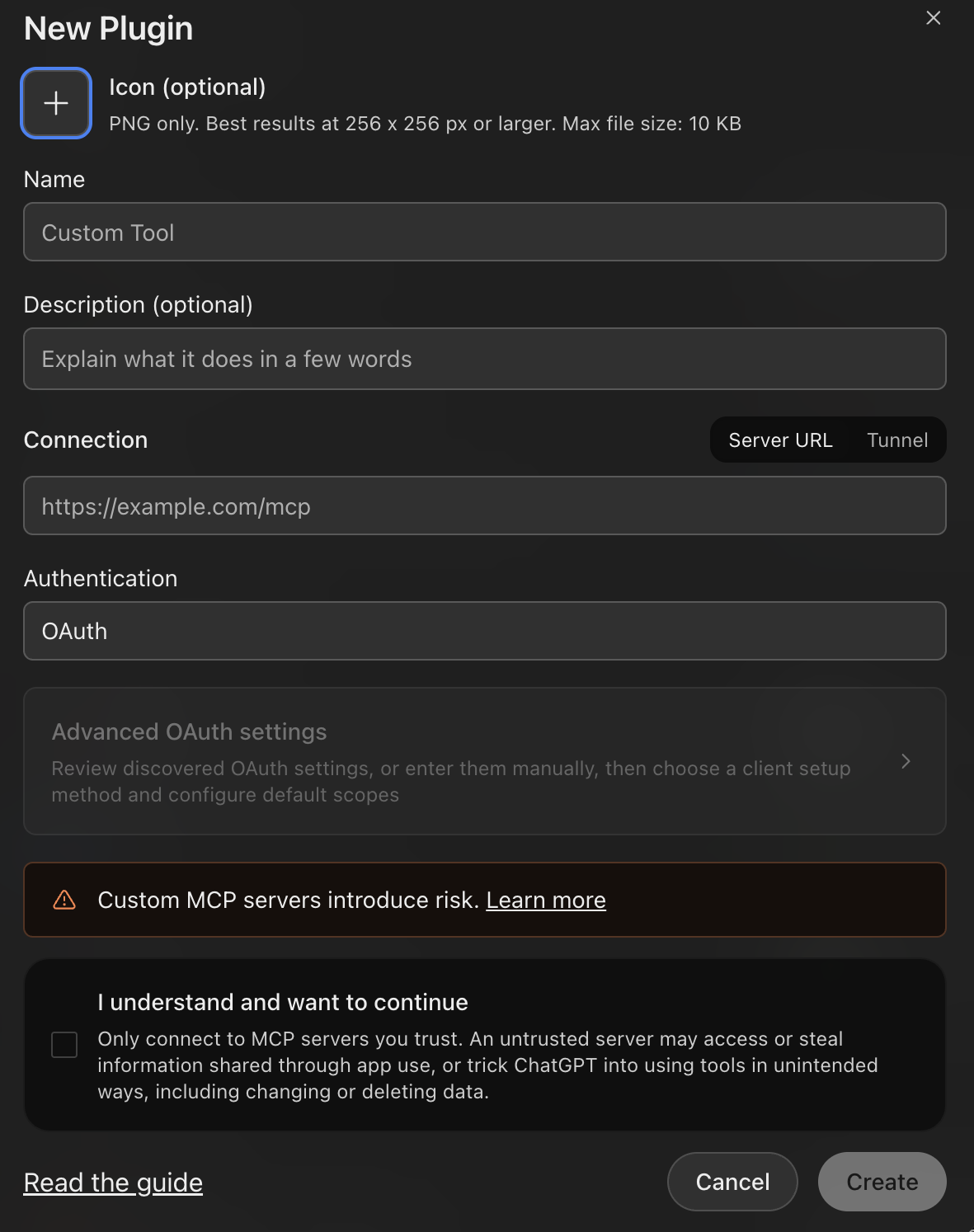
There is also a setup screen for the “New Plugin”. Here, a plugin can be named, get an icon, a description. Also server connections as well as authentication can be defined. So a connected service finally gets an identity inside the product and gets an interface for the interactive usage.
For developers, this changes the distribution question.
A standalone application typically needs to be found, understood, signed up for, and then recalled at a later time. However, an application within the ChatGPT environment has the possibility of appearing to the user at the precise moment that user is attempting to solve the problem the application addresses.
Imagine you are a small business owner. You ask ChatGPT why did sales fall last month? An analytics app would enable you to look at sales data for last month. A customer research app would help you understand why that happened. A campaign app would help you act on what you learned about your customers.
I expect the strongest MCP Apps to make one part of a journey really great. So for example an app that lets a user see something, another that lets them choose from options, and another that edits information. Each app would give the assistant in ChatGPT clear capabilities and a good interface to make use of those capabilities when needed.
Note that having your app be available on a platform with a billion-plus weekly users doesn’t mean your app will get used by a billion people. Distribution, availability, relevance, recommendations, and most importantly, trust, all play into which apps will get used by how many people.
This means that while a platform with a billion+ weekly users opening up access to external developers is very good for the developer (large customer base), having your app discovered by users on ChatGPT (a giant new distribution channel) will ultimately depend on the developer. In other words, availability on the platform does not translate to discoverability.
This open standard is great for technical portability, but not for distribution portability.
Still, the direction is compelling.
MCP made external tools accessible to AI, but MCP Apps makes interactive tools interactive within the same AI powered experience that you are already in. OpenAI’s new extension announcements allow for even richer experiences within that same realm of interaction.
As the way that software is used evolves, I expect more of it to be used in a “task-focused” manner - where the user arrives with a task in mind and various apps surface to assist in the process of completing that task.
Recurse’s role
- Build your agent appInstructions, tools, and tests.
- Deploy to RecurseA hosted runtime for your agent.
- Connect through MCPChatGPT and other MCP hosts.
For people building software, this makes ChatGPT a space worth understanding – your next customer may already be there.
Your next customer may already be there, explaining the problem your product solves.